
By Naeela
To analyze an Amazon search term report, compare every customer query with its clicks, spend, orders, sales, conversion rate, and the SKU's profit boundary. Then sort each term into a specific next action: keep it, add it as an exact target, review the bid, investigate a conflict, or consider a negative.
We tested ALFI's free Amazon PPC Search Term Analyzer with 4 search terms and checked every calculation by hand. It returned 1 negative candidate, 1 exact-match harvest, 1 bid review, and 1 term that needed more evidence. The important part is not the labels. It is knowing why each label appeared and when a human should override it.
Key Takeaways
- Set SKU economics first. In our test, a $30 selling price with $19.50 in product costs, Amazon fees, and return allowance produced a 35% break-even ACoS and a 25% profit-protected target.
- Do not negate every zero-order term. The tool waited until a query reached 12 clicks or $20 in spend before calling it a negative candidate.
- Harvest proven demand deliberately. One broad-match query generated 5 orders from 22 clicks at 22.0% ACoS, so it qualified for exact-match review.
- Read the report as a queue, not an autopilot. All 4 classifications matched the configured rules, but every recommendation still needed campaign, listing, inventory, and brand context.
- Your file stays in the browser. The parser accepts up to 50,000 rows and does not need the report uploaded to ALFI's server.
What is an Amazon search term report?
An Amazon search term report shows the customer shopping queries that produced at least 1 ad click. Amazon distinguishes those queries from the keywords or product targets chosen by the advertiser. A keyword such as “coffee tumbler” can match a more specific customer query such as “leakproof coffee tumbler.”
That distinction is the reason the report matters. Campaign and keyword averages tell you how targeting performed in aggregate. The search term report shows what shoppers actually typed before clicking.
Amazon's Sponsored Products best-practices guide describes Sponsored Products as cost-per-click ads that send the shopper to a product detail page. The same guide says the search term report contains shopping terms that resulted in at least 1 click. Amazon's targeting guide recommends using those results to identify terms worth moving into manual targeting.
The report does not tell you why a shopper failed to buy. A query with 20 clicks and no orders could be irrelevant, but it could also be exposing a weak main image, an uncompetitive price, slow delivery, the wrong variation, or an out-of-stock child ASIN. Search-term analysis identifies where to look. It does not replace retail diagnosis.
How did we test the free Amazon PPC analyzer?
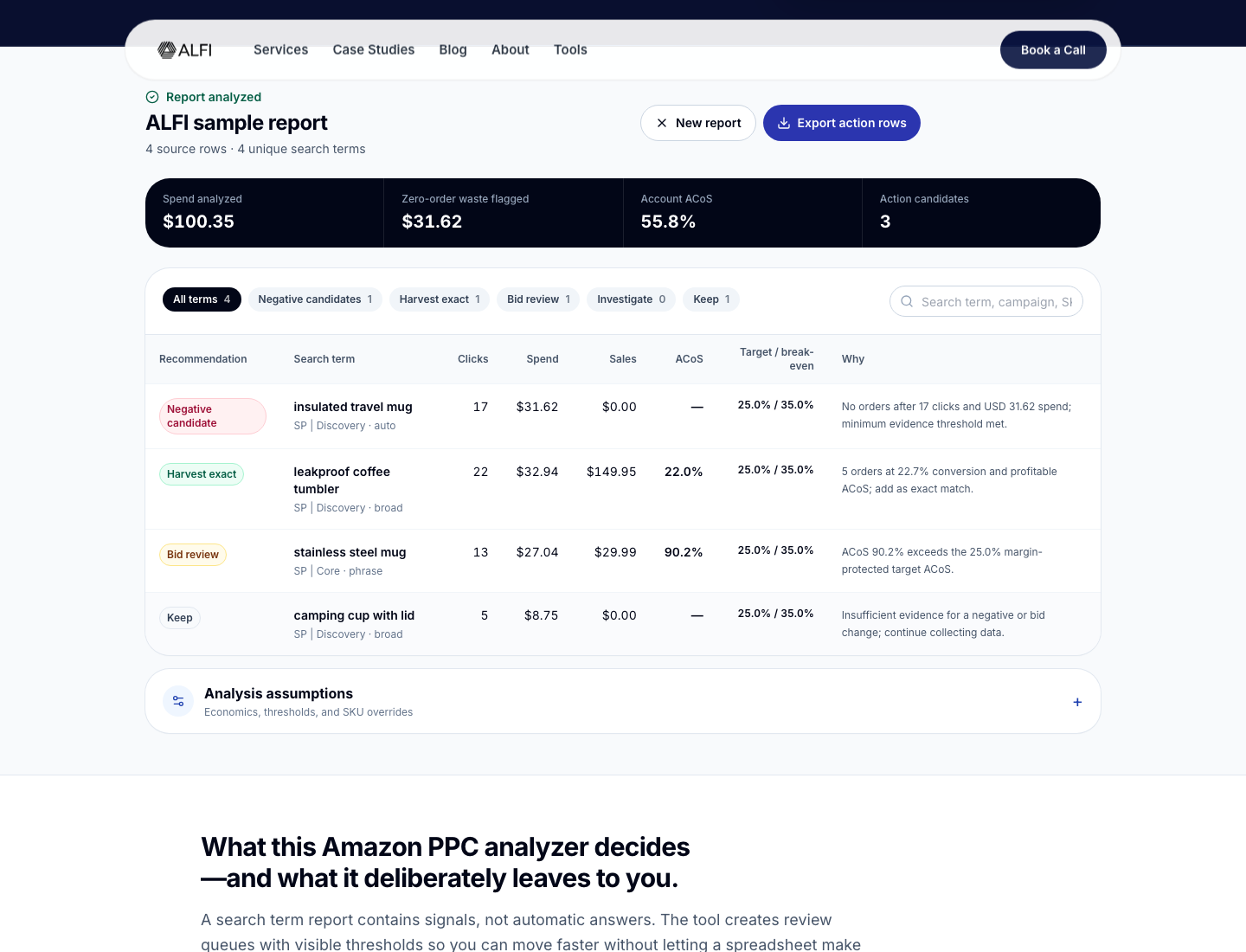
We used the analyzer's built-in sample because it is small enough to audit line by line. The file contained 4 source rows, 4 unique search terms, $100.35 in spend, $179.94 in attributed sales, and a blended ACoS of 55.8%.
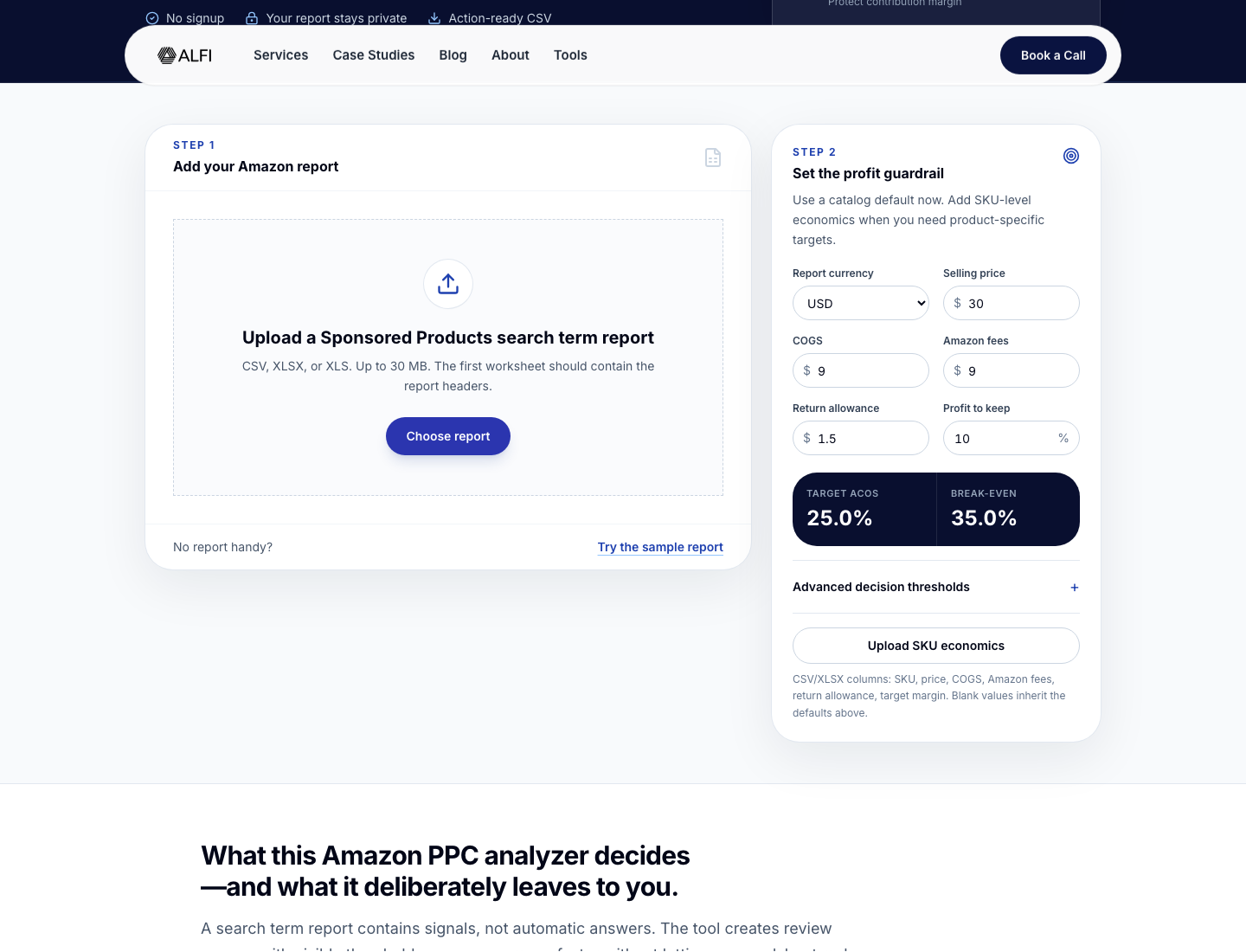
Before running the analysis, we used these economics:
- Selling price: $30.00
- Cost of goods: $9.00
- Amazon fees and fulfilment: $9.00
- Return allowance: $1.50
- Contribution margin to protect: 10%
That leaves $10.50 before advertising. Divide $10.50 by the $30 selling price and break-even ACoS is 35%. Subtract the 10% contribution margin the brand wants to keep, and the operating target becomes 25%.
These inputs are not universal benchmarks. They are a test model. A $30 product with different fulfilment costs, promotions, return rates, or landed cost will have a different boundary. Established brands should upload SKU-level economics when one report covers products with materially different margins.
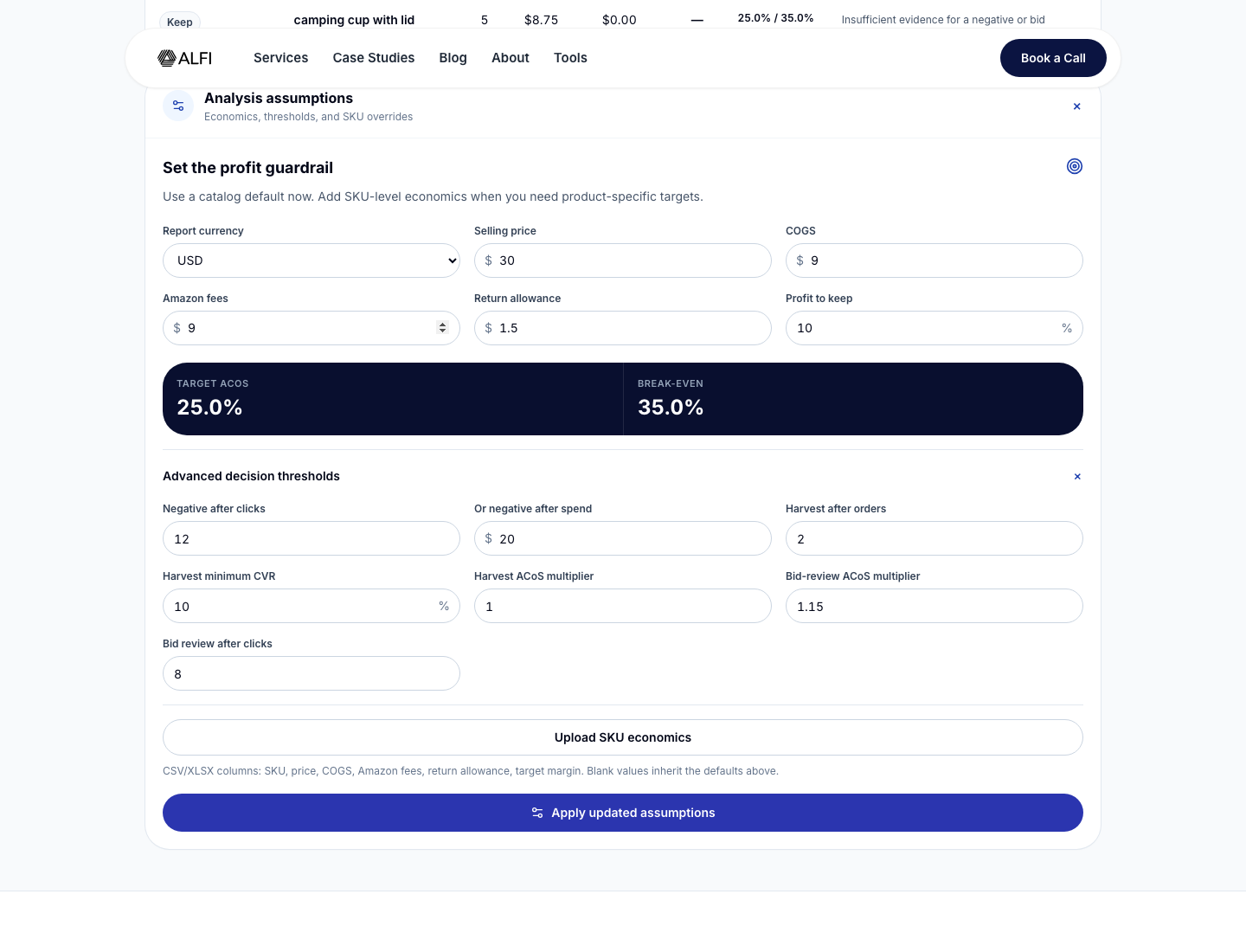
We also checked the default action rules. A zero-order term becomes a negative candidate after 12 clicks or $20 in spend. An exact-match harvest requires at least 2 orders, a 10% conversion rate, ACoS at or below the target, and a source match type that is not already exact. A bid review triggers when ACoS is more than 1.15 times the target or when a zero-order term reaches 8 clicks without enough evidence for a negative.
Those are editable operating thresholds, not rules issued by Amazon. That distinction matters.
What results did the analyzer produce?
The math and classifications matched the configured rules across all 4 rows.
Why was “insulated travel mug” a negative candidate?
The query received 17 clicks, spent $31.62, and generated 0 orders. It cleared both default evidence boundaries: 12 clicks and $20 in spend.
That makes it a sensible negative candidate, not an automatic negative. We would first check whether the query accurately describes the product and whether the advertised SKU was retail-ready during the report window. If the mug is not insulated, the decision is straightforward. If it is highly relevant, the zero orders may point to the offer or listing instead.
Why was “leakproof coffee tumbler” marked for exact harvest?
This broad-match query produced 5 orders from 22 clicks, a 22.7% conversion rate. It spent $32.94 and generated $149.95 in sales, giving it a 22.0% ACoS. That was below the model's 25% target.
The term cleared all 3 harvest gates: at least 2 orders, at least 10% conversion, and ACoS no higher than the target. Moving it into a controlled exact-match structure can make its bid, budget, placement, and performance easier to read.
Do not create a duplicate exact target blindly. The analyzer checks whether the same term already exists in an exact-match context and changes the recommendation to “investigate” when it finds one.
Why did “stainless steel mug” need a bid review?
The term produced 1 order from 13 clicks. It spent $27.04 against $29.99 in sales, which equals 90.2% ACoS. That is far above the 25% profit-protected target.
The next action is not necessarily a large bid cut. Check whether the query is important non-branded demand, whether conversion changed after a price or content change, and whether the product can afford a temporary learning exception. The classification says the economics deserve review. It does not prescribe the size of the change.
Why was “camping cup with lid” kept?
This query had 5 clicks, $8.75 in spend, and no orders. It had not reached the 8-click bid-review threshold, the 12-click negative threshold, or the $20 spend threshold. “Keep” therefore means continue collecting evidence, not that the term is profitable.
This is one of the tool's most useful behaviours. A crude waste report would call every zero-order term bad. A brand operating across hundreds of low-volume terms would end up deleting discovery before it had a fair test.
How do you use the Amazon PPC Search Term Analyzer?
1. Export the correct Amazon Ads report
In the Amazon Ads console, create a Sponsored Products search term report for the marketplace and period you want to review. The analyzer needs the customer search term, clicks, spend, sales, and orders columns. Campaign, ad group, targeting, match type, SKU, ASIN, impressions, units, and currency improve the output.
Use one currency per analysis. The tool rejects mixed-currency files rather than combining USD and CAD into a meaningless total. CSV and Excel files are supported.
2. Open the free tool and add the report
Go to the Amazon PPC Search Term Analyzer, select the file, and let the browser parse it. The parser runs locally and accepts up to 50,000 rows. The tool combines duplicate rows that share the same campaign, ad group, term, targeting, match type, SKU, ASIN, and currency.
If the file has missing required columns, mixed currencies, or inconsistent metrics such as sales with 0 orders, the tool stops or places the affected row in “investigate.” That is safer than manufacturing a recommendation from broken data.
3. Set the profit guardrail
Enter price, COGS, Amazon fees and fulfilment, return allowance, and the contribution margin you want to retain. The analyzer calculates:
Break-even ACoS = (price - COGS - Amazon fees - return allowance) / price
Target ACoS = break-even ACoS - contribution margin to protect
If several SKUs have different economics, use the SKU override file. A blended margin can make a strong term look weak on one product and make a loss-making term look acceptable on another.
4. Adjust evidence thresholds when the business case requires it
Open “Analysis assumptions” to change the click, spend, order, conversion, or ACoS multipliers. The defaults are a starting point for triage. They are intentionally visible and editable.
Higher-price, low-conversion products often need a different evidence window from inexpensive repeat-purchase items. A launch may also tolerate more learning spend than a mature cash-generating SKU. Write down the exception and expiry date instead of quietly moving the goalposts each week.
5. Work the queues in context
Filter the output by action and review the rationale:
- Negative candidate: no orders after the configured click or spend boundary.
- Harvest exact: enough orders and conversion, ACoS within target, and not already exact.
- Bid review: ACoS exceeds the configured multiple or zero-order clicks need attention.
- Investigate: bad source data, an existing exact target, cross-campaign conversion, or duplicated targeting context needs a human decision.
- Keep: performance is within the boundaries or the term lacks enough evidence.
Download the action CSV if you want a working file. Treat it as a decision queue, not a bulk-upload instruction sheet.
How should a real Amazon brand use the results?
Run a weekly waste and discovery review
Use a consistent 7-day operating rhythm, but read 7-, 28-, and 60-day windows together where volume allows. The short window catches sudden waste. The longer windows show whether a query has repeatable economics or only one lucky order.
Start with negative candidates, then harvest terms, bid reviews, and conflicts. The sequence clears obvious leakage while preserving proven demand. Our broader Amazon PPC optimization playbook puts this review after economics and retail readiness, not before them.
Give each major SKU its own economics
A portfolio brand should not judge a $19 accessory and a $120 hero product against one account target. Upload SKU economics or split the analysis into commercially similar groups. Compare the output with the contribution-margin method before moving bids or budgets.
Use harvest terms to improve account structure
A profitable query found through automatic or broad targeting is evidence of demand. Add it to a deliberate manual structure, then decide how the discovery campaign should handle that traffic. Amazon's keyword-targeting guide recommends using reporting metrics to identify relevant terms and using negative keywords to exclude queries that do not fit the objective.
Exact-match isolation is not automatically better. If the same term converts across multiple products or campaign roles, investigate routing and cannibalization first.
Pair bad terms with the live detail page
Open the advertised child ASIN before negating a relevant query. Check Featured Offer status, stock, price, coupon, delivery promise, rating, main image, variation selection, and recent content changes. A poor conversion rate can be a listing or offer failure wearing a PPC costume.
This is also why a universal “good ACoS” is weak advice. The Amazon ACoS guide explains how margin and objective change the answer.
What can the tool get wrong?
The analyzer is useful because its rules are explicit. It is still a rules engine, not an Amazon Ads operator.
Treat very recent report windows as provisional. Re-export the same period before making a consequential change, and confirm that the report's sales and order columns match the window your team intends to review.
Profit is modelled, not observed. The calculation is only as accurate as the price, COGS, fee, fulfilment, returns, and SKU data provided. It does not fetch current Amazon fees or reconcile finance data.
The report lacks retail context. It cannot know that a coupon ended, the Featured Offer changed, a hero variation stocked out, or delivery slipped from 2 days to 8. It also cannot judge brand strategy, keyword rank, incrementality, or the value of a defined launch experiment.
Finally, a recommendation is not proof of causation. A term marked “bid review” tells you that the observed result crossed a boundary. It does not prove that the bid caused the result.
Is ALFI's Amazon PPC analyzer worth using?
Yes, for fast, transparent triage of a Sponsored Products search term report. In our test, its economics and all 4 actions matched the published formulas and rules. It protected immature data from premature negation, flagged profitable discovery, and kept the thresholds editable. Local browser processing is a meaningful benefit for brands that do not want raw advertising reports sent to another server.
It is not a campaign-management platform, attribution system, or substitute for commercial judgment. Its best role is to turn a large report into a smaller review queue that a capable operator can work through.
Where does ALFI fit, and where does it not?
ALFI is built for established brands generating $1M+ a year on Amazon, or $1M+ DTC brands ready to make Amazon a serious channel. We cap the roster at 18 brand partners so founder-led strategy and senior delivery stay close to the work.
We do not sell PPC-only management. Advertising decisions sit inside a connected Amazon operating system covering listings, catalog, creative, inventory, pricing, and profit. That end-to-end authority matters when a weak search-term result could be caused by the offer, the detail page, stock, or the campaign itself.
The free analyzer is the better fit for a capable self-managed team that needs a repeatable review queue. An early-stage seller or a brand with one contained campaign problem should use the tool or hire a focused specialist before paying for a full operating model. If the functions around PPC keep producing conflicting answers, see how ALFI approaches Amazon advertising as part of the full account.
What is the difference between a search term and a keyword on Amazon?
A keyword or product target is selected by the advertiser. A search term is the customer's actual shopping query that matched the ad and produced a click. One broad keyword can match many search terms, which is why keyword-level averages can hide both profitable demand and irrelevant spend.
How often should Amazon brands analyze search terms?
Review them weekly for active accounts, but use more than one date range. A 7-day view catches new waste, while 28- and 60-day views add context for lower-volume terms and provisional results. Weekly review does not mean every query needs a change every 7 days.
How many clicks should a term get before adding a negative keyword?
There is no universal Amazon threshold. ALFI's tool defaults to 12 clicks or $20 in spend with 0 orders, and both values are editable. Use the SKU's available contribution, expected conversion rate, relevance, report-window maturity, and campaign objective before making the final negative decision.
Does the analyzer upload my Amazon Ads report?
No. The report parser runs locally in the browser, and the tool does not require the raw file to be uploaded to ALFI's server. It supports CSV and Excel files up to 50,000 rows. Normal browser and website analytics can still record general tool events, not report contents.
Can I use one target ACoS for every product?
Only when the products have genuinely similar unit economics and objectives. Most established portfolios should use SKU-level overrides or separate analyses. A blended target can hide losses on low-margin products and suppress growth on high-margin products, even when the account-level ACoS appears acceptable.
What to do this week
- Export a Sponsored Products search term report for one marketplace and one currency.
- Write the true price, COGS, Amazon fees, return allowance, and contribution target for each priority SKU.
- Run the file through the free Amazon PPC Search Term Analyzer.
- Validate the top 10 negative candidates against the live child-ASIN pages before adding exclusions.
- Move proven non-exact queries into a controlled harvest review and check for existing exact targets.
- Review expensive relevant terms against conversion, offer, inventory, and the current business objective.
- Record every material decision, its owner, expected effect, and the date you will judge it.